Mastering the 20 Ounce Skinny Tumbler Template for Perfect Wraps
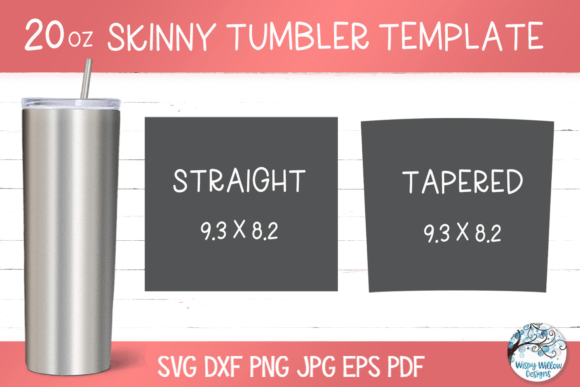
If you have ever tried to design a custom wrap for a skinny tumbler, you know the frustration of measuring, guessing, and ending up with a crooked seam or a design that bunches up at the taper. It is a common headache for crafters and small business owners alike. That is where a reliable 20 ounce skinny tumbler template becomes your most valuable design asset. This particular template is built for the popular 20 oz skinny straight and tapered tumblers, providing a precise digital canvas that takes the guesswork out of sublimation and vinyl projects.
Think of it as your digital blueprint. The template is not just a random shape; it is a carefully measured outline that corresponds exactly to the physical product. This means when you place your artwork, pattern, or branding onto the template in your design software, you can visualize exactly how it will wrap around the curved surface. The included formats—SVG, DXF, PNG, JPG, EPS, and PDF—ensure compatibility with virtually any design tool you use, from Adobe Illustrator and CorelDRAW to free programs like Inkscape or even Cricut Design Space. This versatility is crucial for a smooth workflow, whether you are a seasoned graphic designer or a hobbyist just starting with a cutting machine.
Beyond the Blank Canvas: Understanding the Template's Anatomy
A good 20 ounce skinny tumbler template is more than just a rectangular outline. For a straight tumbler, the template is a simple rectangle, but the real magic happens with the tapered version. The template accounts for the slight narrowing at the bottom, which means your design needs to be created on a subtle trapezoid shape to print and adhere without distortion. This is a critical detail that separates a professional-looking product from an amateur one. When you download a template pack that includes both straight and tapered versions, you are equipped to handle the two most common styles of skinny tumblers on the market.
The file formats included are designed for maximum utility. The SVG and DXF files are vector formats, meaning they are infinitely scalable without losing quality. This is perfect for vinyl cutters where you need a crisp, clean cut line. The PNG file with a transparent background is a lifesaver for sublimation printing. You can layer your artwork directly onto the transparent template in Photoshop or Procreate, see exactly how the wrap will look, and then print it onto your sublimation paper. The JPG, EPS, and PDF files round out the package, offering options for different software preferences and print workflows. Having all these formats in one instant download saves you time and technical hassle.
Practical Applications: From Personal Projects to Product Lines
The uses for a precise tumbler template extend far beyond personal crafting. For entrepreneurs and small business owners, this is a foundational tool for product development. Imagine you are launching a line of custom tumblers for a local coffee shop or a wedding favor business. Using a 20 ounce skinny tumbler template ensures every single cup you produce has consistent branding. Your logo placement will be identical on every unit, and your patterns will align perfectly at the seam. This level of consistency is what builds brand recognition and conveys professionalism to your customers.
For designers and marketers, the template is a prototyping powerhouse. Before committing to a large production run, you can create a digital mockup. Place your client's logo, a seasonal graphic, or a full-wrap pattern onto the template and present it as a realistic preview. This is incredibly valuable for pitching ideas or getting client approval. It transforms an abstract concept into something tangible and visual. Content creators and bloggers can also use these templates to create engaging "flat lay" style graphics for social media, showcasing potential designs without ever needing to photograph a physical product first.
Tips for a Flawless Design and Production Process
Working with the template effectively requires a bit of practical knowledge. First, always check the dimensions provided with your template against the physical tumbler you own, if possible. While templates are generally standardized, slight variations exist between manufacturers. Second, when designing for sublimation, remember that the edges of your design will wrap around the tumbler. It is good practice to extend your background pattern or color slightly beyond the template lines to avoid any white gaps after pressing. For text and critical logos, keep them within a "safe zone" about a quarter-inch inside the template edges to ensure nothing gets cut off during the wrap.
Font pairing and color choice also play a role, even on a curved surface. If your tumbler design includes text, choose a typeface that remains legible at the size it will be printed. A bold sans serif font often works well for brand names, while a delicate script might be better for a monogram or accent word. Test your color combinations on screen; what looks vibrant on your monitor might appear different when printed on sublimation paper and transferred onto the coated tumbler surface. Doing a small test print on a scrap piece of sublimation paper can save you from wasting a full tumbler blank.
Ultimately, a well-crafted 20 ounce skinny tumbler template is a bridge between your creative vision and a high-quality finished product. It streamlines your workflow, reduces material waste, and elevates the professionalism of your output. Whether you are making a one-time gift or building a product empire, starting with the right template is a strategic move that pays off in precision, efficiency, and polished results. It is a simple tool that solves a complex problem, allowing you to focus on the creative part of the job—the design itself.