Master Your App Store Presence with Premium Screenshot Templates
In the crowded digital marketplace of the Apple App Store, your app's first impression isn't made with a paragraph of text—it's made with visuals. For designers, entrepreneurs, and small business owners, creating high-impact marketing materials often requires a significant investment of time. The App Store Preview Screenshot Templates are designed specifically to bridge the gap between a functional app and a marketable product. These aren't just generic frames; they are professional design assets built to meet the exact technical specifications required by Apple, ensuring your submission process is smooth and your visual presentation is flawless.
Precision Engineering for Visual Hierarchy
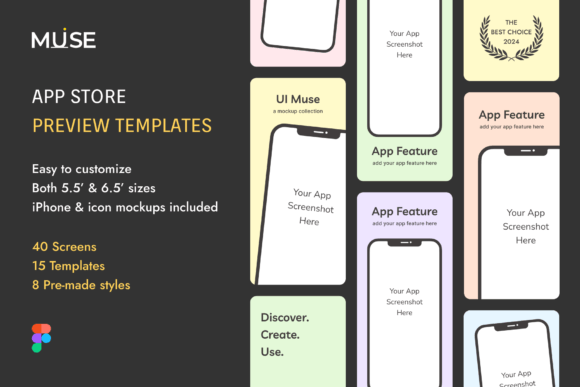
One of the most common pitfalls in web design and app marketing is misalignment with platform guidelines. Apple requires specific dimensions for different devices, and failing to adhere to these can result in rejected submissions or stretched, unprofessional imagery. This toolkit includes the actual sizes required for both 5.5-inch and 6.5-inch devices, which is essential for maintaining visual hierarchy. When your screenshots are crisp and correctly formatted, it signals to potential users that the app itself is high-quality.
The inclusion of the iPhone 12 Max mockup is particularly valuable. Modern brand identity relies heavily on showing your product in a contemporary context. Using an outdated device frame can make an app feel abandoned or neglected. By utilizing these current mockups, you ensure that your graphic design speaks the language of today's technology, immediately boosting brand perception and trustworthiness.
Customization and Visual Personality
While the technical specs are vital, the soul of these templates lies in their adaptability. The package comes equipped with 6 pre-made color styles, ranging from vibrant and energetic to muted and corporate. This variety allows you to align the screenshots with your specific brand identity. Whether you are launching a playful game or a serious productivity tool, the color palette sets the emotional tone before the user even reads a single word.
Furthermore, the package includes 8 distinct styles and 15 templates. This level of customization prevents the "cookie-cutter" look that plagues many store listings. You can mix and match layouts to tell a story, guiding the user’s eye from the most compelling feature to the secondary benefits. This is where modern typography and layout principles come into play. The templates provide the structure, but the 100% customizable nature means you retain full creative control over the typography and composition.
Streamlining the Creative Workflow
For the busy content creator or marketer, efficiency is currency. Starting a design from scratch for every app update is unsustainable. These App Store Preview Screenshot Templates function as a robust design system. By having a library of pre-sized, pre-styled layouts, you drastically reduce the time spent on technical setup.
Consider the workflow for a blogger or publisher launching a companion app. They are experts in editorial design and content, not necessarily the pixel-perfect demands of iOS development kits. These templates remove the guesswork. The included iOS icon template ensures that the app icon—often the most critical piece of logo design for a digital product—matches the style and quality of the screenshots. Consistency between the icon and the preview images is a subtle but powerful psychological trigger that improves click-through rates.
Practical Application and Strategy
When preparing your assets, think of your screenshots as a condensed packaging design. Just as a physical box needs to communicate value instantly, your digital shelf presence must do the same. I recommend selecting 3 to 5 of the 15 templates to serve as your "hero" images. These should feature your strongest value propositions.
Use the customizable text areas to highlight key features using a premium font that contrasts well with the background styles provided. If your app uses a lot of data, choose a style that allows for clear readability. If your app is visual, choose a style that maximizes the screen real estate for the app interface itself. The goal is to create a seamless flow that encourages the user to tap "Get."
Ultimately, these templates are more than just files; they are a marketing strategy in a zip file. They allow you to present your app with the same level of polish as top-tier studios, leveling the playing field for indie developers and small businesses. By investing in high-quality design assets, you are investing in the perceived value of your software.