Editable Wedding Planner Canva Templates: Your Ultimate Guide
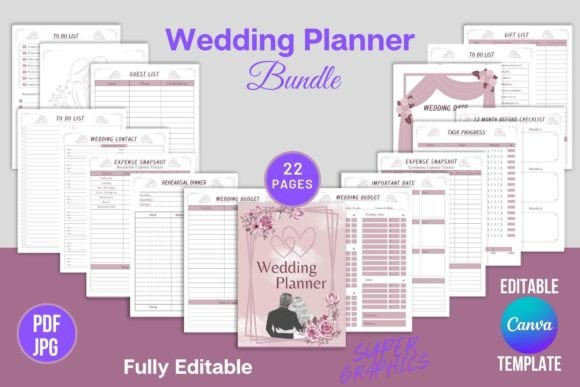
Planning a wedding is one of the most exciting yet demanding projects you’ll ever undertake. Between managing guest lists, tracking budgets, and coordinating with vendors, the sheer volume of details can feel overwhelming. This is where having a structured, beautiful system makes all the difference. Editable Wedding Planner Canva Templates offer a practical solution, transforming the planning process from chaotic to coordinated. This comprehensive digital planner provides a 22-page toolkit designed to keep every aspect of your special day organized, accessible, and visually consistent.
What Makes This Digital Wedding Planner Stand Out?
At its core, this is a professionally designed, print-ready PDF and JPG file set built for customization in Canva. The planner includes 20 different templates across 22 pages, each formatted at 8.5 x 11 inches at 300 DPI in CMYK color with no bleed. This technical specification means your final prints will be sharp, color-accurate, and ready for professional or home printing. The design itself balances modern typography with clean layouts, offering a harmonious blend of serif and sans serif fonts that ensure readability while maintaining an elegant aesthetic. The overall personality is sophisticated yet approachable, avoiding overly ornate scripts in favor of clear, contemporary letterforms that won’t distract from your critical planning information.
The practical value extends beyond aesthetics. Each page is thoughtfully structured to address specific planning phases. You’ll find dedicated sections for the 12 Month Before Checklist, Wedding Budget, Guest List, and even post-event pages like After the Wedding and Thank You notes. This isn’t just a collection of pretty pages; it’s a functional system. The inclusion of an Expense Snapshot and Task Progress tracker, for instance, applies project management principles to wedding planning, helping you visualize your to-do list and financial status at a glance. For the creative professional or detail-oriented individual, this structure mirrors the kind of organized workflow used in successful branding or marketing campaigns.
How This Planner Enhances Your Planning Workflow
The true strength of these Editable Wedding Planner Canva Templates lies in their flexibility and impact on your planning efficiency. By centralizing all information in a single, cohesive document, you eliminate the friction of switching between disparate apps, spreadsheets, and notebooks. This consistency reduces cognitive load, allowing you to focus on decisions rather than document hunting. The visual hierarchy established by the template design—using varying font weights, strategic spacing, and clear section headings—guides your eye naturally to the most important information, much like effective editorial design in a magazine or report.
From a branding perspective, your wedding has its own identity. These templates act as a foundational design asset for that identity. Using the same stylistic approach across your Important Dates, Rehearsal Dinner plans, and Gift List creates a sense of professionalism and care that extends to every interaction, whether you’re sharing details with your wedding party or reviewing plans with your partner. The modern typography ensures the document feels current and polished, while the ample white space and clean lines prevent visual clutter, making it easier to absorb complex information like budget breakdowns or lengthy guest lists.
Practical Applications Beyond the Wedding Day
While the primary function is wedding planning, the utility of these templates extends into other creative and personal projects. The Notes and To Do List pages can be repurposed for planning other large events, such as milestone anniversaries, large family reunions, or even professional launch events. For entrepreneurs, bloggers, or content creators who are getting married, this planner can serve as a case study in organized project management. You might even adapt the layout principles for your own digital products or client-facing documents, observing how the font pairing and spacing contribute to a user-friendly experience.
For designers and hobbyists, the editable Canva link is a gateway to deeper customization. You can adjust colors to match your wedding palette, experiment with alternative font pairings within Canva’s library, or add personal touches like monograms or custom illustrations. This hands-on approach not only results in a planner that feels uniquely yours but also offers practical experience in working with a professional template structure. You’ll see firsthand how subtle changes to typography—like adjusting line height or letter spacing—can influence readability and the overall visual rhythm of a document.
Choosing and Using Your Wedding Planner Effectively
When you first open the editable Canva link, take a moment to review all 22 pages. Familiarize yourself with the flow, from the initial Belongs To Page and Wedding Contact sheets to the final Thank You Page. This overview will help you understand the designer’s intended structure and where you might want to inject your personality. Before making major edits, consider your wedding’s overall brand identity. Are you aiming for rustic charm, modern minimalism, or classic elegance? The existing design serves as a versatile foundation, but aligning it with your theme will make it feel even more integrated into your celebration.
A key practical step is to prioritize which sections you’ll use most actively. For many, the Wedding Budget and Guest List will become living documents, updated weekly. The 12 Month Before Checklist is invaluable for breaking down the planning timeline into manageable milestones. Use the Task Progress page not just as a list, but as a motivational tool—checking off completed items provides a tangible sense of accomplishment. Remember, the goal of this tool is to serve you, not the other way around. Don’t hesitate to delete pages that don’t apply to your plans or duplicate sections like the To Do List if you need more space for brainstorming.
Finally, consider the output. Since the files are high-quality, print-ready PDFs, you have the option to create a physical binder. Printing the pages and organizing them in a dedicated planner can be incredibly satisfying and provides a backup digital-free reference. The 300 DPI and CMYK color specifications ensure that whether you print at home or use a professional service, the colors will remain true and the text will be crisp. This blend of digital flexibility and print reliability makes the Editable Wedding Planner Canva Templates a robust tool for any couple embarking on their planning journey, offering a perfect marriage of form and function.